Download HanMod
Pick the version that matches your device, then follow the short steps on the card.
Android
arm64-v8a + armeabi-v7a
For Android phones and tablets. Pick the APK that matches your phone.
- Platform
- Android
- Architecture
- ARM 64-bit and ARM 32-bit
- Supported
- 32-bit and 64-bit devices
- Version
- Game 8.3.105 · Mod 3.0.16
- Updated
- November 28, 2026
- Package
- APK
- Keys
- Free or Premium
Download APK 64-bit
arm64-v8a - most phones, tablets and emulators
Download APK 32-bit
armeabi-v7a - older phones and some 32-bit emulators
- Install the free app DevCheck: Device & System Info from Google Play. Open DevCheck on Google Play
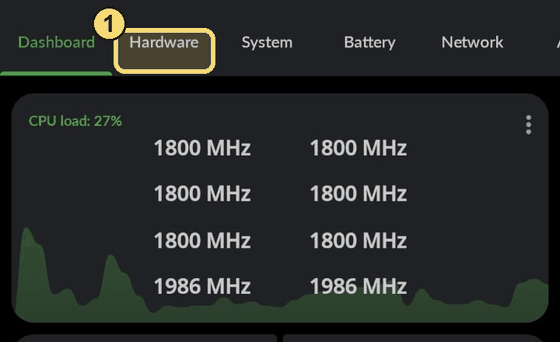
- Open the app and tap the Hardware tab (mark 1).
- On that page, find the line ABI (mark 2).
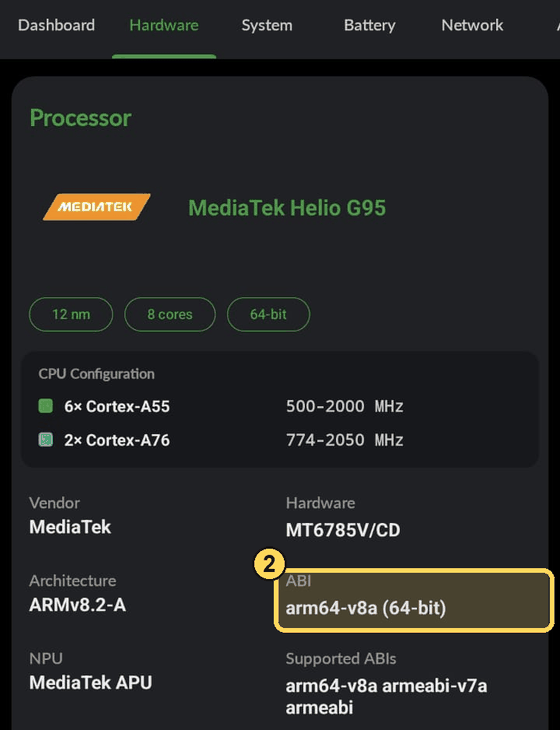
- Read the result:
- arm64-v8a (64-bit): download the 64-bit APK.
- Only armeabi-v7a or armeabi (32-bit): download the 32-bit APK.
- Using an emulator? Download the 64-bit (arm64) APK.
Picked the wrong one? Android simply refuses to install it and nothing breaks. Use the other APK.
Still not sure? Ask the admin
- Install the original game from the Play Store.
- Install Google Play Games if you do not have it yet.
- Download the mod APK and extract it.
- Open the original game and wait until the Google Play Games logo appears.
- Close the original game, delete it, then install the mod APK.
- Open the mod and make sure the Google Play Games logo appears.
- If a popup asks you to enter a key, close it with the X. You will enter the key later.
- Log in with Google / Google Play.
- Once you are in the lobby, enter your key.
Steam (Windows)
x64
For the Steam version on a Windows PC.
- Platform
- Windows 64-bit (Steam)
- Requires
- The Steam version of the game, installed
- Version
- Game 8.4.107 · Mod 0.0.3
- Updated
- November 28, 2026
- Package
- Launcher
- Keys
- Premium only
Free keys are not supported on the Steam version. Use a Steam premium key (Android keys do not work here).
- Install the game from Steam and start it once so its folder is created.
- After you buy a key, download the launcher from the payment page and copy HanMod-Launcher.bat into the game folder, next to TheSpike-Cross.exe.
- Double-click HanMod-Launcher.bat and choose [1] to install or update and start the game. The launcher downloads the files it needs by itself.
- If it offers to exclude the game folder from Windows Defender, that is optional: it always asks first, and you can answer n to skip.
- Enter your Premium key in the game. Always start the game through the launcher, so it can restart the game automatically after your key is checked.
- To remove everything later, run the launcher again and choose [2].